Contents
Support Managers
|
Xartashah
English
| online |
|
Aerielle Kiyori
English
| offline |
|
Alexander Pixels
English
| offline |
|
Amyalka
English
| offline |
|
Glaznah Gassner
English, Russian
| offline |
|
Justina Mcminnar
English
| offline |
|
Makaylah Wurgle
English
| offline |
|
MeanGirlPickmeFinalBoss
English
| offline |
|
Sammyredfire
English
| offline |
|
shorty McKeenan
English
| offline |
| show offline managers | |
| English, Russian |
Bot access code
Main > Information for existing customers > Bot access code
| Personal Bots |
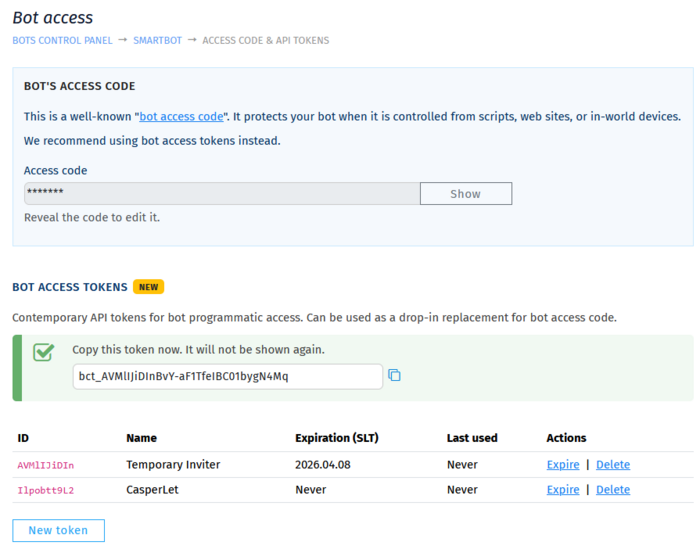
Bot access codes and API tokens are ways for you to authenticate your bot with scripts, plugins and devices. It works like the Security code for groups, but controls access to your personal bot.
Since March 2026, the new and preferred way is to use API tokens.
Setting the API Token
- Login to your account at https://mysmartbots.com.
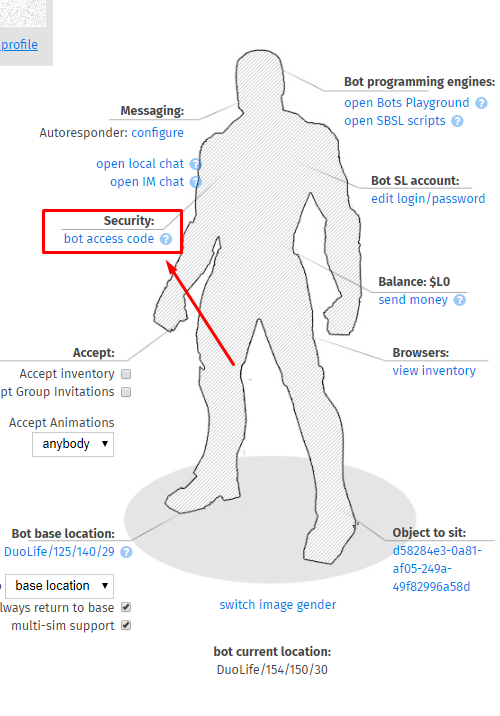
- In the menu on the left, click 'Your personal bots' and then 'manage bot'.
- Click Security > Access code & API tokens.
- Click 'New Token' and enter a name and expiry for the token.
Setting the Legacy Bot Access Code
- Login to your account at https://mysmartbots.com.
- In the menu on the left, click 'Your personal bots' and then 'manage bot'.
- Set or change the bot access code: